Restaurant ordering looks simple until several decisions meet on one small screen. A customer chooses a pizza, changes ingredients, checks allergen information, selects delivery or pickup, applies an offer, and requests a time. Each step changes what the customer needs to understand before committing to the order.
The La Favola Brescia case study describes the connected customer, staff, and API surfaces. Source review shows menu allergen fields, configurable ingredients, server pricing and fulfilment checks, and idempotency records. This article uses those foundations to explain practical UX choices; recommendations below do not imply that every suggested recovery state has already been independently verified on a released mobile build.
Put useful menu information before the first decision
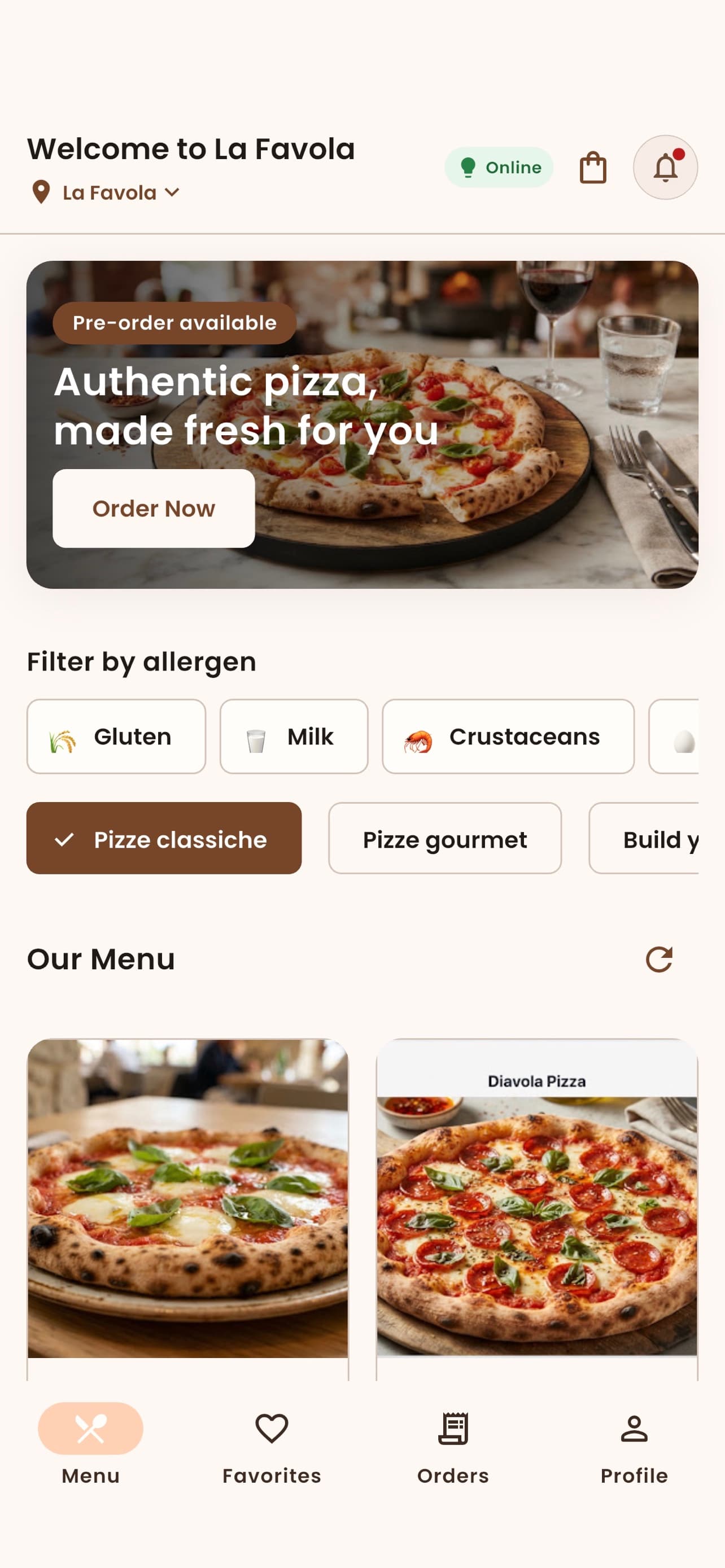
A menu card should help a customer distinguish items without opening several screens. Show the name, a readable description, relevant price information, and a clear path to ingredients and allergen details. Photography can support discovery, but tiny text embedded inside an image is difficult to read or translate.
Keep information available after a filter is applied. A filter can reduce the list according to recorded menu data; it should not remove the customer's ability to inspect that data. Search, categories, and item details should agree about unavailable items so a customer does not build an order around a choice the restaurant cannot currently supply.
Distinguish ingredient data from a safety assurance
La Favola's API includes menu allergen tags and ingredient allergen information. These fields can support discovery and review, but absence of a tag does not establish that a meal is suitable for a particular allergy. Missing information, an explicitly reviewed declaration, and a recipe without a listed ingredient are different states.
The Food Standards Agency's ordering advice highlights recipe changes, ingredient substitutions, and kitchen cross-contact as questions to discuss with staff. The UX implication is to make current information easy to find and provide a clear staff-contact route. Do not turn a database filter into an allergen-free claim.
For a new data contract, an illustrative model can distinguish unknown information from a reviewed declaration:
type AllergenInfo = {
  status: 'unknown' | 'reviewed';
  contains: string[];
  mayContain: string[];
};
This is a design example, not La Favola's existing schema. The important behavior is to avoid presenting an empty array as certainty when the record has not been reviewed.
Recalculate the customized item as a whole
A pizza builder changes more than the preview. Additions, removals, size, and quantity can affect the price and ingredient information shown in the final review. Keep the selected options visible, and let the customer return to edit them without reconstructing the whole item.
Use the server to validate allowed combinations and calculate authoritative totals. The browser or app can display provisional feedback quickly, but checkout must reconcile against current rules. La Favola's modernization contract explicitly keeps pricing and fulfilment authority on the server. If a price or available ingredient changes, explain the change before asking the customer to continue.
Make mobile controls readable and recoverable
An ingredient row should have a clear label, an understandable selected state, and a touch area that does not depend on hitting a small icon. The W3C labeling tutorial explains how programmatically associated labels help people identify controls. Apply that principle to customization options, addresses, and checkout fields as well as conventional contact forms.
Keep the order summary accessible without covering important controls. Test with the onscreen keyboard open, larger text enabled, and a narrow viewport. If the interface uses a bottom sheet, verify that its scroll region reaches the final action and that validation messages remain visible. A static desktop screenshot cannot establish those behaviors.
Ask the restaurant whether a time is still available
A selected time is a request that must be checked against restaurant-local scheduling rules, preparation constraints, and current availability. The customer's device timezone is not the restaurant's timezone. Show the intended local date and time clearly, particularly when the customer is traveling or ordering ahead.
La Favola's API contains availability and scheduled-fulfilment checks. A robust customer flow should recheck at order submission and preserve the cart if the chosen option becomes unavailable. Offer a supported next choice rather than silently moving the order to a different time. A full-screen generic error leaves the customer uncertain about both the order and their selections.
Separate an uncertain request from a failed order
A mobile connection can drop after the server accepts checkout but before the app receives confirmation. Creating a new checkout request immediately can duplicate an order. La Favola has idempotency records and customer gateway retry handling in source, which provide a foundation for identifying repeated attempts.
The client also needs a durable recovery strategy across process restarts. Retain the relevant operation identity where appropriate, query the recorded outcome, and reconcile before starting a new attempt. A disabled submit button only protects the current screen session. Error copy should say whether the order was rejected, remains uncertain, or has been found and can be opened.
Keep tracking and validation tied to actual events
Distinguish order acceptance, preparation, readiness, delivery, cancellation, and any applicable payment state. A successful payment event does not itself prove kitchen acceptance or delivery. Show the latest known state with appropriate recovery when the network is unavailable, and avoid animating progress beyond recorded evidence.
The W3C validation guidance recommends clear feedback that helps people correct input. Apply that to a changed address, expired option, or invalid offer: identify the affected field or choice, explain what needs attention, and retain valid entries. Keep Italian and English wording aligned with the same business state.
Takeaway
Good ordering UX makes each commitment understandable. Preserve ingredient choices, communicate the limits of allergen data, recheck pricing and availability on the server, and recover uncertain checkout outcomes deliberately. The most useful final test follows an actual customer journey through customization, interruption, correction, and a clearly recorded order state.